Oracle Help Desk provides configuration options to automate queue routing, status updates and notifications, reducing manual effort and ensuring requests are handled consistently from submission to resolution.
Queue Routing: Ensure Prompt Resolutions
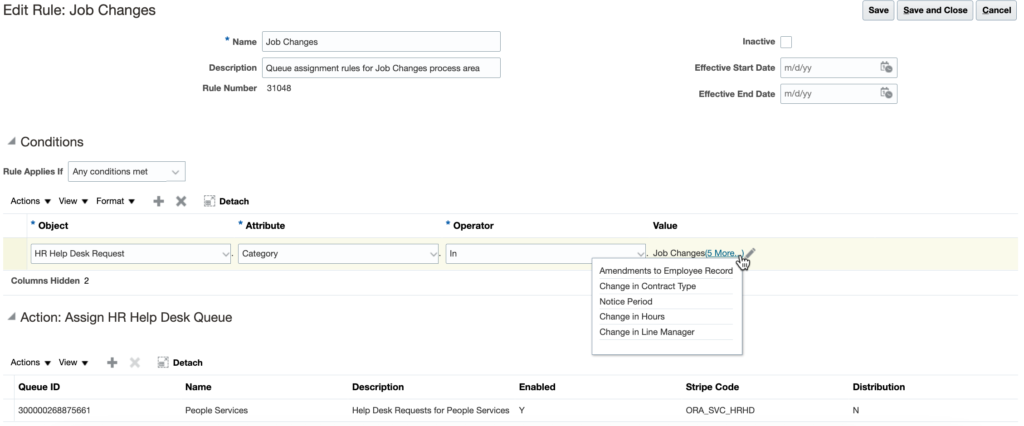
Oracle Help Desk routes requests to the right team using a queue mechanism, with rules configured based on the functional area or topic, and additional information about the enquiry, employee and organisation.
Requests can be manually assigned to a specific queue or team member when escalating to tier 2 or 3 support specialists.
an example of a queue routing rule configuration in Oracle HR Help Desk
Status Updates: Track Request Progress
Oracle Help Desk provides standard request statuses: new, in progress, waiting, resolved and closed. Custom statuses can be configured where more granularity is needed. For example:
Assigned to Specialist — request is with a tier 2 or 3 support specialist
Additional Information Required — employee has responded with follow-up questions
Oracle Help Desk provides two options for automating status updates:
Profile options: “Maximum days SR in Waiting” and “Maximum days SR in Resolved” automate status updates after a specified duration.
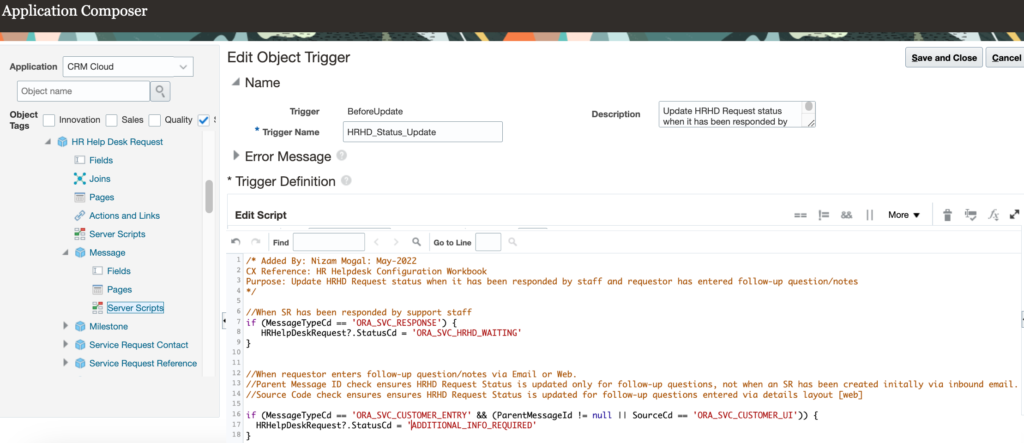
Groovy scripts: custom triggers that automatically update status based on specific events, such as changing status to “Additional Information Required” when an employee responds, or “Waiting for Your Action” when an agent replies.
an example of a Groovy script that automates the update of HR Help Desk Request status
Notifications: Keep Stakeholders Informed
Oracle Help Desk supports email and Bell notifications (in-app push notifications) throughout the request lifecycle. Key notifications to configure:
Acknowledgement — sent to the employee when a request is submitted
Response — sent to the employee when an agent responds
Follow-up — sent to the agent when an employee responds with additional questions
Waiting reminder — sent to employees who have not provided required information within a specified period
Agent action reminder — sent to agents if no action has been taken within a specified period
Resolution — sent to the employee when their request is resolved
Final Thoughts
Configuring queue routing, status automation and notifications in Oracle Help Desk reduces manual handling and gives both employees and support teams a structured, responsive experience.
Nizam Mogal
Enterprise Applications Architect | Oracle ACE Pro
Nizam Mogal
Enterprise Applications Architect | Oracle ACE Pro
Nizam brings over 20 years of global experience delivering Oracle enterprise solutions.e specialises in Oracle Fusion Cloud across HCM, ERP, Help Desk, Case Management and Fusion Service, with a track record of implementing both Redwood and Classic UX for HR and Finance in global enterprises.
With deep product expertise, Nizam provides strategic insight and hands-on experience to ensure implementations are aligned to each organisation’s needs.