Help Desk agents can update multiple requests at once. For example, a Level 0 support agent may identify a few requests that need assigning to a specialist.
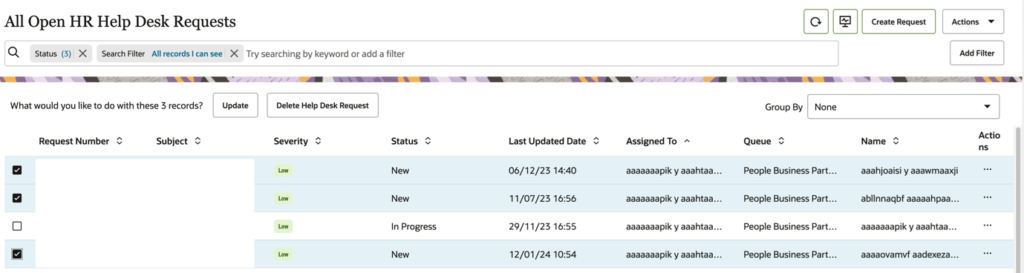
Step 1: Select the requests you want to update and click Update.
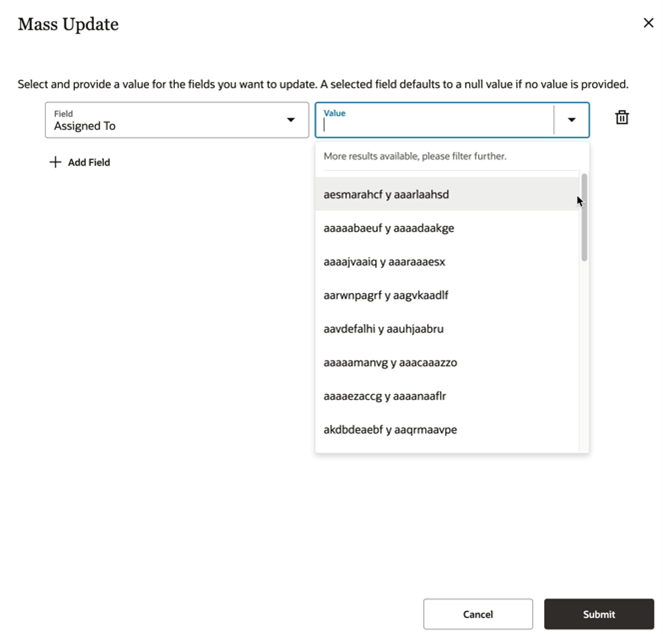
Step 2: Choose the field you want to update, enter the value and click Submit.
Other fields that can be updated simultaneously:
Assigned To
Category Name
Severity
Status
By default, the mass update feature is not enabled and must be activated through configuration. Additional fields can also be made available for mass update.
Nizam Mogal
Enterprise Applications Architect | Oracle ACE Pro
Nizam Mogal
Enterprise Applications Architect | Oracle ACE Pro
Nizam Mogal is an Enterprise Applications Architect with over 20 years of global experience delivering Oracle enterprise solutions. He specialises in Oracle Fusion Cloud across HCM, ERP, and Fusion Service, with a track record in Oracle Help Desk, Case Management, HR and Finance service delivery.
With deep product expertise, Nizam provides strategic insight and hands-on experience to ensure implementations are aligned to each organisation’s unique service model and operational goals.