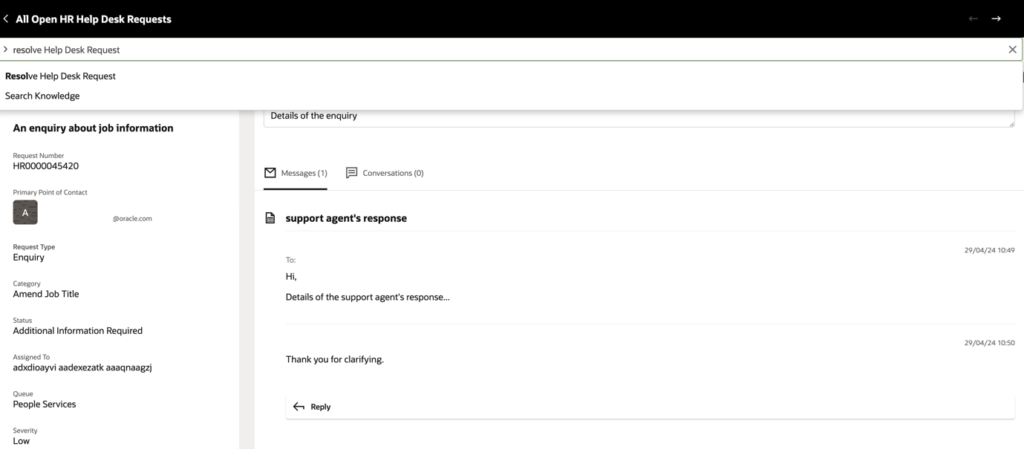
Smart Actions are specific actions available on the Oracle Help Desk Request page, accessible through the action bar “What would you like to do?” at the top of the summary page. Typing a few letters activates a list of available Smart Actions.
Selecting a Smart Action reveals the relevant fields for that action, guiding the user through completion.
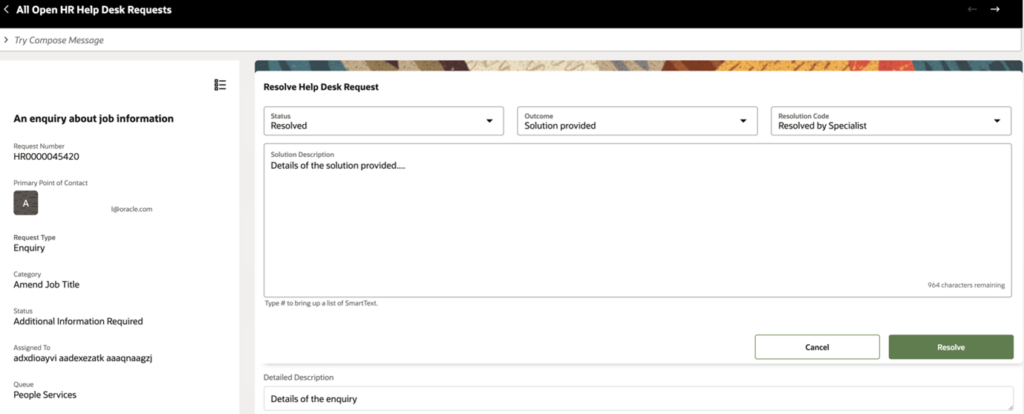
For example, the Resolve Help Desk Request action reveals the resolution fields directly on the page.
Available Smart Actions on a Help Desk Request include:
Add Resource
Add Contact
Add Attachment
Add Action Plan
Add Action
Assign To Me
Compose Email
Compose Message
Compose Web Message
Compose Internal Note
Capture Customer Message
Copy Help Desk Request
Create Appointment
Create Task
Create Relationship
Delete Help Desk Request
Resolve Help Desk Request
Start Internal Conversation
Show Audit History
Show Interactions
Search Knowledge
Transfer Help Desk Request
Update Related Objects
Smart Actions remove the need to scroll through the full request record to find and update specific fields — keeping agents focused and efficient.
Nizam Mogal
Enterprise Applications Architect | Oracle ACE Pro
Nizam Mogal
Enterprise Applications Architect | Oracle ACE Pro
Nizam Mogal is an Enterprise Applications Architect with over 20 years of global experience delivering Oracle enterprise solutions. He specialises in Oracle Fusion Cloud across HCM, ERP, and Fusion Service, with a track record in Oracle Help Desk, Case Management, HR and Finance service delivery.
With deep product expertise, Nizam provides strategic insight and hands-on experience to ensure implementations are aligned to each organisation’s unique service model and operational goals.