Guided Journeys in Oracle Fusion — Helping Users Complete Workflows with Confidence

Nizam Mogal

Nizam Mogal

Enterprise Applications Architect | Oracle ACE Pro

When users complete a transaction in Oracle Fusion Cloud, they need guidance on the process, the policy requirements and what is expected at each step. Guided Journeys deliver this in context, embedded within the workflow, so users can be self-assisted to complete transactions correctly and in line with company policies, reducing the need to raise a support query.
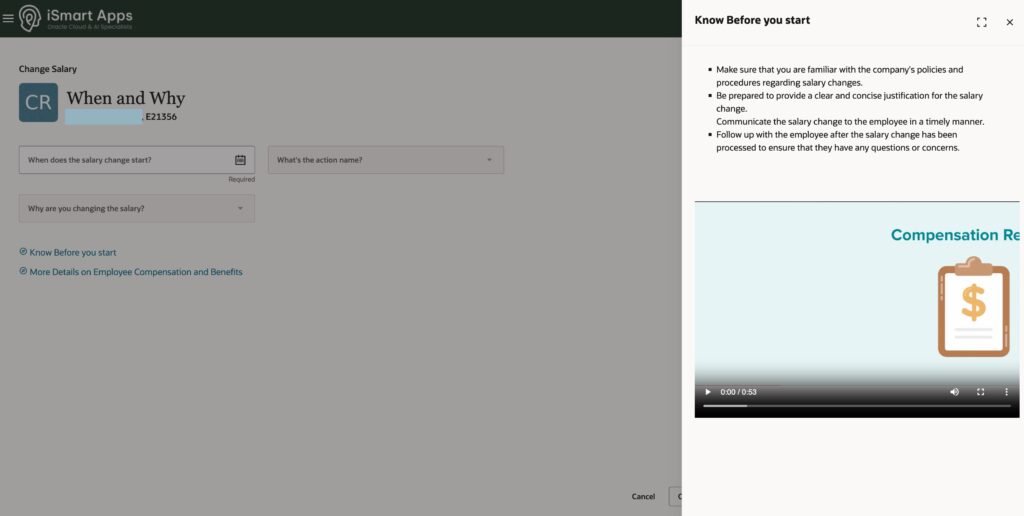
A Guided Journey appears as a panel alongside a transaction page when a user selects a link to see relevant guidance — instructions, policy references, videos, documents — specific to that step.

From Guided Journeys I have configured for Core HR workflows including Transfers, Salary Change and Promotions, managers get answers to policy questions and guidance rather than reaching out to HR

The same applies in procurement. Users navigating a purchase requisition for the first time have policy guidance and process steps available without raising a support query. 

  1. Instructions — step-by-step guidance on completing the transaction 
  2. Videos — embedded process walkthroughs 
  3. AI Agents — finding answers or doing work without leaving the page 
  4. Embedded Learning — training content relevant to the task 
  5. Documents — supporting reference materials 
  6. Analytics — data relevant to the workflow 
  7. External URLs — links to external resources or systems 


The key point is guidance is contextual and appears where the work happens. Users don’t have to search through a separate training system or document library to find it.

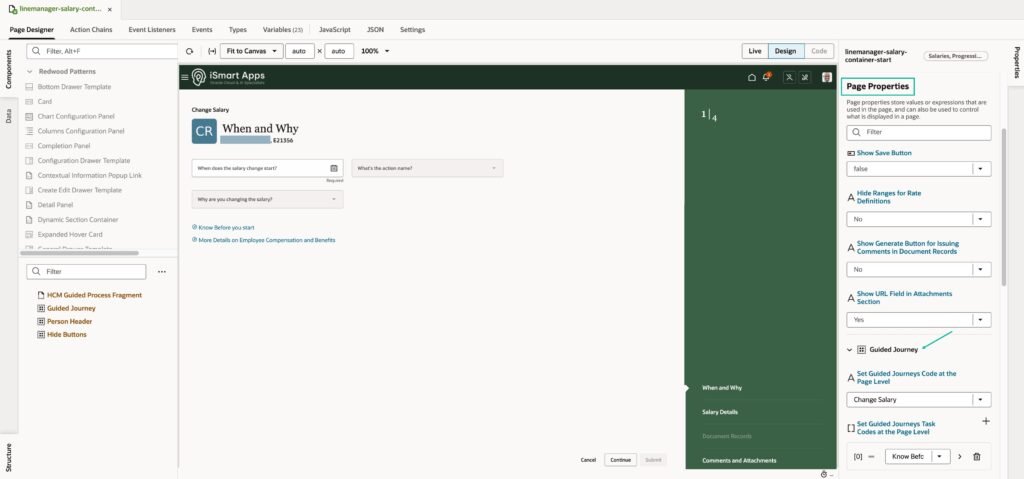
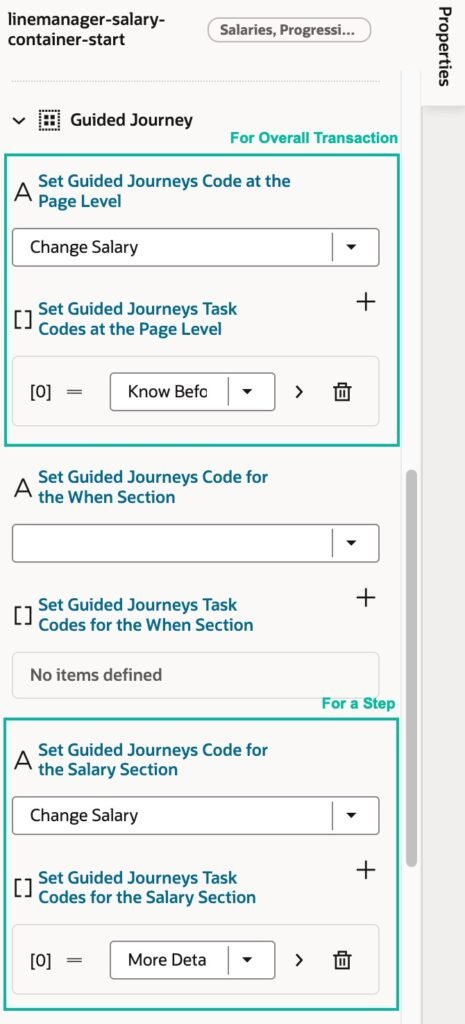
Guided Journeys are enabled on specific pages and workflows in Oracle Fusion Cloud. You can verify whether Guided Journeys are enabled on a page by opening it in Visual Builder Studio and checking for Guided Journey properties in Page Properties. 

The most common use cases I have seen are: 

  1. Core HR: Transfer, Promote, Salary Change, Terminations and other self-service transactions for employees and managers 
  2. Procurement: guidance on self-service procurement and purchase requisition creation  

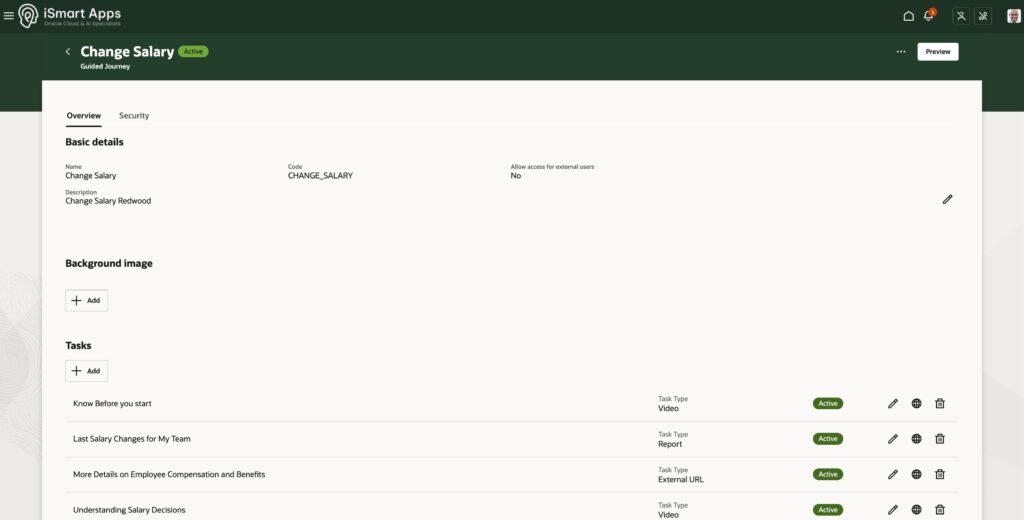
First, configure content for Guided Journeys using the Journeys Setup app in Oracle Fusion Cloud.

Then, using Visual Builder Studio, specify the Guided Journey reference on the page where you need it. You can configure at page level for the overall transaction, and at section level for more granular guidance for each step within the transaction.

In my experience the impact was evident in three ways. Compliance improves because policy requirements are visible at the point of decision, reducing errors and shortcuts. Users adopt workflows faster because the guidance is right there on the page. And support queries drop because users can help themselves.

Interested in exploring Guided Journeys for your Oracle Fusion Cloud environment? Get in touch. Or explore our Oracle Fusion Cloud sessions and live demos on our Events page.


Nizam Mogal
Enterprise Applications Architect | Oracle ACE Pro

Nizam Mogal
Enterprise Applications
Architect | Oracle ACE Pro

Nizam Mogal

Nizam brings over 20 years of global experience delivering Oracle enterprise solutions. Specialising in Oracle Fusion Cloud across HCM, ERP and Fusion Service, with a successful track record of implementing Oracle Help Desk and Case Management solutions across HR, Finance, and Supply Chain.

With deep product expertise, Nizam provides strategic insight and hands-on experience to ensure implementations are aligned to each organisation’s unique service model and operational goals.

Share this article on

You might like